

Printer: Definition, Types, Price & How to Choose?
A printer is an output device that converts digital documents, images and graphics into physical copies on paper or other compatible materials. Printers receive information from computers, laptops, smartphones or other devices and reproduce it using ink, toner, heat or specialized printing technology.
Common types include inkjet, laser, ink tank, thermal, dot matrix, multifunction and Direct-to-Film (DTF) printers. They are used in homes, offices, schools, retail businesses, warehouses and commercial printing facilities. In the UAE, basic home printers are available for a few hundred dirhams, while business and industrial printing equipment can cost several thousand dirhams or more.
IT hardware supplier Crown Excel offers wholesale printer solutions for businesses, resellers and organizations purchasing printing equipment in bulk. Choosing the right printer depends on printing volume, document type, print quality, operating costs, connectivity and budget.
What Is Printer?
A printer is an electronic output device that produces physical copies of digital text, photographs, documents and graphics on paper or other supported printing materials. It receives data from a computer or another compatible device and uses printing mechanisms such as inkjet nozzles, laser imaging or thermal elements to transfer the required information onto a physical surface. Printers are commonly used for office documents, invoices, educational materials, photographs, receipts, labels and commercial printing applications.
How Printer Works?
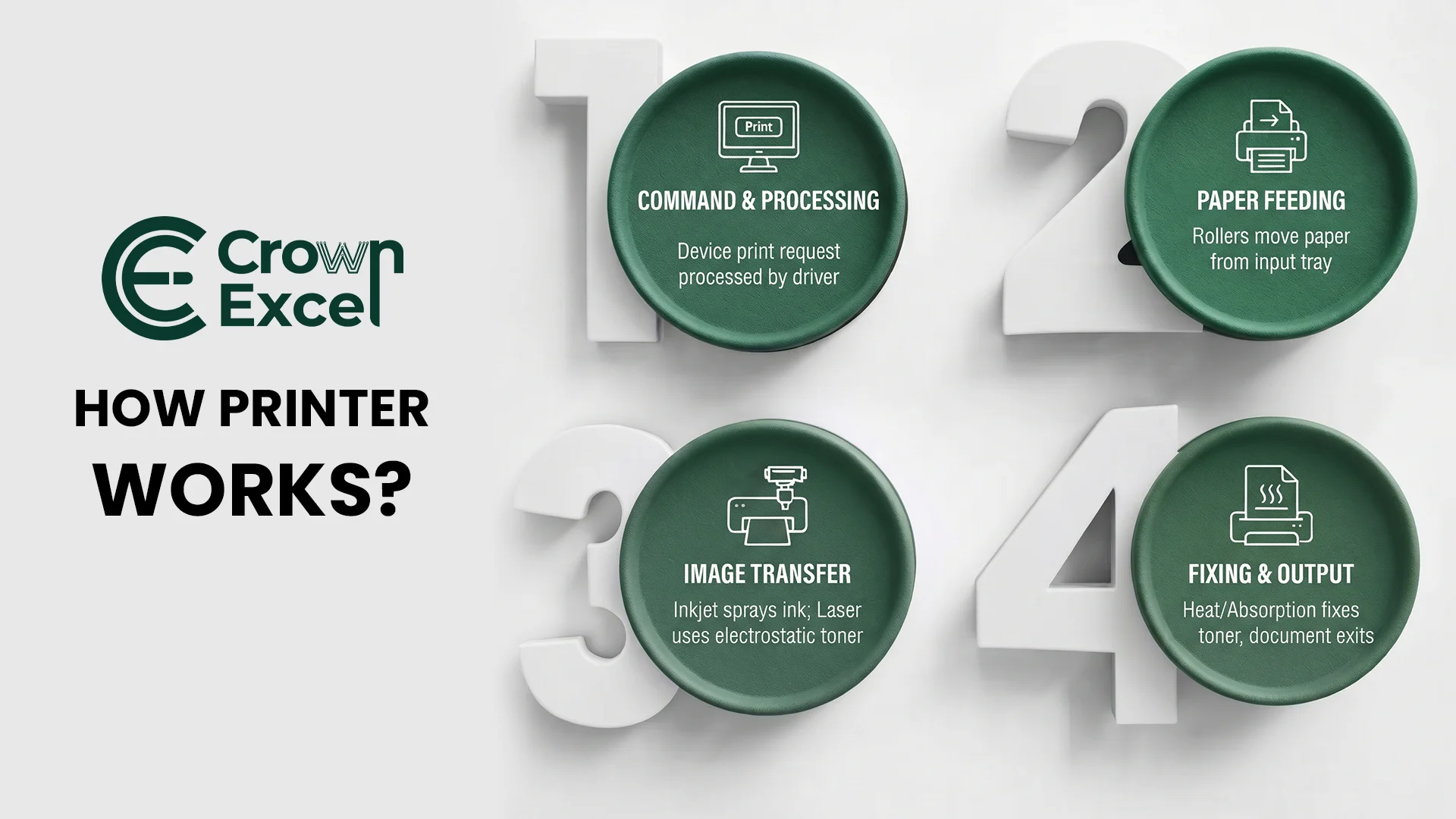
A printer works by receiving digital information from a connected device, processing the print instructions and reproducing text or images on a suitable material. The printing mechanism depends on the technology being used. Inkjet printers spray microscopic ink droplets onto paper, while laser printers use electrostatic imaging, toner and heat to produce printed documents.
The printing process generally follows these steps:
Receive the Print Command: The user selects a document or image and sends a print request from a computer, smartphone or another compatible device.
Process the Print Data: The printer driver, application or printer controller converts the document into instructions that the printer can process.
Prepare the Printing Mechanism: The printer positions the paper and prepares its printhead, toner system or other printing components.
Feed the Paper: Rollers move paper or another supported printing material from the input tray into the printer.
Transfer the Image: An inkjet printer deposits ink droplets, while a laser printer transfers toner to the paper using an electrostatic imaging process.
Fix the Printed Image: In laser printers, a heated fuser bonds toner to the paper. Inkjet printers rely on the ink's interaction with the printing material and its drying or absorption.
Deliver the Printed Output: The completed document moves into the output tray for collection.
What Are the Types of Printer?
The types of printers include inkjet, laser, ink tank, dot matrix, thermal, multifunction, photo, label, DTF, DTG, sublimation, large-format and 3D printers. They differ in their printing technology, supported materials, operating costs and intended applications. Inkjet and laser printers are commonly used for everyday documents, while specialized printers support activities such as textile decoration, product labelling and industrial production.
The main types of printers are:
Inkjet Printer: Sprays microscopic ink droplets onto paper to print documents, photographs and colour graphics.
Laser Printer: Uses electrostatic imaging, toner and heat to produce sharp text and graphics, commonly for office printing.
Ink Tank Printer: Uses refillable ink reservoirs instead of conventional small cartridges, making it suitable for frequent printing where low ink cost per page is important.
Dot Matrix Printer: Uses pins striking an inked ribbon to create characters and images, commonly for multipart forms and specialized business records.
Thermal Printer: Uses heat to create images on thermal media or transfer ink from a ribbon, commonly for receipts, barcodes and shipping labels.
Multifunction Printer (MFP): Combines printing with functions such as scanning and copying, with fax capabilities available on certain models.
Photo Printer: Produces photographic prints using inkjet, dye-sublimation or other supported imaging technologies.
Label Printer: Prints product labels, barcode stickers, address labels and inventory identification materials.
Direct-to-Film (DTF) Printer: Prints designs onto specialized film using compatible inks, allowing the designs to be transferred onto fabrics through adhesive powder, curing and heat pressing.
Direct-to-Garment (DTG) Printer: Prints suitable designs directly onto fabric, commonly for customized T-shirts and other garments.
Dye-Sublimation Printer: Uses heat to transfer dye onto compatible coated materials or polyester-based fabrics.
Large-Format Printer or Plotter: Produces oversized drawings, architectural plans, posters, banners and technical graphics.
3D Printer: Creates three-dimensional objects from digital designs by adding material layer by layer.
LED Printer: Uses an LED imaging array rather than a scanning laser to create the electrostatic image used in electrophotographic printing.
Impact Line Printer: Prints entire lines using mechanical impact mechanisms, traditionally for high-volume data processing and specialized business applications.
What Are the Components of Printer?
The components of a printer include the printhead or imaging mechanism, paper tray, feed rollers, control board, power supply and output tray. These parts work together to receive printing instructions, move printing materials and reproduce text or images. The exact components depend on the printer's technology, as inkjet printers use ink delivery systems, while laser printers contain toner, imaging drums and fuser assemblies.
The main printer components include:
Printhead: Deposits ink onto paper through microscopic nozzles in inkjet printing systems.
Ink Cartridge: Stores ink used by compatible inkjet printers.
Ink Tank: Holds refillable ink in printers designed with reservoir-based ink systems.
Toner Cartridge: Contains toner powder used in laser and related electrophotographic printers.
Imaging Drum: Carries an electrostatic image that helps transfer toner during laser printing.
Fuser Assembly: Uses heat and pressure to bond toner to the printing material.
Paper Input Tray: Holds paper before it enters the printer.
Paper Feed Rollers: Move paper through the printing mechanism.
Output Tray: Collects completed printed documents.
Printer Controller Board: Processes printing instructions and controls the printer's electronic and mechanical operations.
Memory: Temporarily stores print data, instructions and operational information.
Power Supply: Provides electrical power to the printer's components.
USB Port: Connects compatible printers to computers and other supported devices.
Network Interface: Enables supported printers to communicate through Ethernet or wireless networking.
Control Panel: Allows users to operate printing functions and view device status.
Display Screen: Shows printer settings, notifications, errors and operational information on compatible models.
Sensors: Detect paper position, open covers, ink or toner conditions and other operating states.
Duplex Printing Unit: Enables automatic printing on both sides of a sheet in supported models.
Scanner Assembly: Captures images of documents in multifunction printers.
Automatic Document Feeder (ADF): Feeds multiple pages into the scanning mechanism on compatible multifunction printers.
Waste Ink or Toner Collection System: Collects excess ink or toner generated during certain printing and maintenance operations.
Motors and Drive Mechanisms: Move paper, printheads and other mechanical components.
Printhead Carriage: Moves the printhead across the printing area in many inkjet printer designs.
Firmware: Controls printer operation, hardware functions and supported communication features.
What Is the History of Printer?
The history of computer printers developed from early mechanical printing equipment into electronic printing systems used for data processing and document production. During the 1950s, manufacturers introduced high-speed printers for large computer systems. Remington Rand developed a high-speed printer for UNIVAC in 1953, while IBM introduced the IBM 1403 line printer in 1959. These early computer printers primarily used mechanical impact mechanisms to reproduce text and numerical information.
Printer technology continued to develop during the 1960s and 1970s. Epson introduced its compact EP-101 digital printer in 1968, while improvements in dot matrix and laser technologies expanded printing capabilities. During the 1980s, personal and office printers became more accessible. HP introduced the original LaserJet in 1984 and the DeskJet inkjet printer in 1988, helping bring non-impact printing technology into smaller workplaces.
During the 1990s and 2000s, colour inkjet printers, multifunction devices, digital photography printers and network-connected office machines became more widespread. Modern printers now support features such as wireless printing, automatic duplexing, high-capacity ink tanks, secure printing and mobile device connectivity. Specialized technologies, including DTF and 3D printing, have expanded printing beyond traditional paper documents into garment customization and physical object production.
What Is Printer Used For?
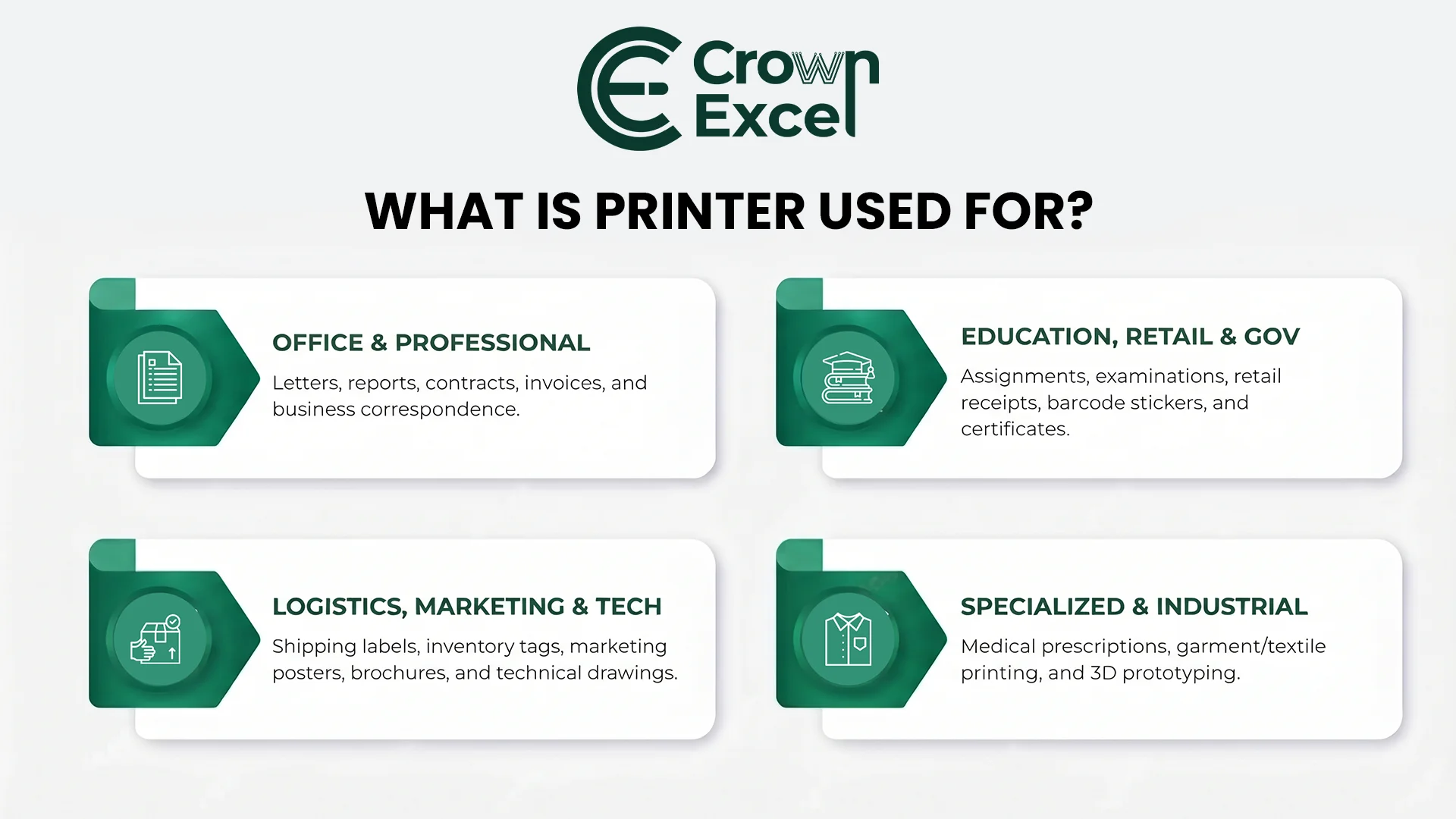
A printer is used to produce physical copies of digital information, including documents, photographs, labels, reports and graphics. Printers support everyday personal activities as well as commercial and industrial operations. Their applications depend on the printing technology, supported materials and required output volume.
The major uses of printers include:
Office Documentation: Print letters, reports, contracts, meeting documents and business correspondence.
Education: Produce assignments, worksheets, examinations, certificates and classroom learning materials.
Business Invoicing: Print invoices, quotations, purchase orders and transaction records.
Retail Operations: Generate receipts, product labels, price tags and barcode stickers.
Healthcare: Print permitted medical reports, prescriptions, patient documents and administrative records.
Banking and Finance: Produce financial statements, application forms and other authorized documents.
Photography: Print digital photographs and visual materials using compatible photo printers.
Shipping and Logistics: Generate shipping labels, packaging identifiers, inventory labels and tracking documents.
Marketing and Advertising: Print promotional materials, posters, brochures, flyers and banners.
Engineering and Architecture: Produce technical drawings, plans and large-format design documents.
Garment Printing: Apply custom designs to T-shirts, uniforms and other compatible textiles using DTF, DTG or sublimation processes.
Manufacturing: Produce identification labels, product documentation and specialized industrial printing output.
Government Administration: Print application forms, certificates, notices and official records where physical documentation is required.
3D Prototyping: Manufacture physical prototypes, models and selected functional parts using additive manufacturing printers.
What Is the Printer Wholesale Price in UAE?
The wholesale price of printers in the UAE depends on the manufacturer, printing technology, model, order quantity, product availability and warranty conditions.
Basic inkjet and monochrome laser printers generally cost less than enterprise colour laser printers, commercial multifunction systems and industrial printing equipment.
These figures are retail price examples, not wholesale quotations. They can vary by retailer, promotion, stock status and date. Buyers should not assume that a particular percentage discount or margin applies to bulk purchases.
Crown Excel offers bulk and wholesale printer solutions in Dubai and across the UAE, supplying printing equipment for business operations, offices, resellers and commercial procurement. Its published printer range includes HP LaserJet and Color LaserJet models, Canon PIXMA ink tank printers and Epson printers. Examples include the HP LaserJet MFP M141a, Canon PIXMA G3410, Canon PIXMA G2430 and enterprise HP multifunction printers.
Businesses seeking wholesale printer pricing from Crown Excel should specify the required brand, exact model, quantity, printing volume and delivery location. A complete quotation should also clarify VAT, warranty coverage, delivery charges, compatible consumables and any requested installation or support services.
For a practical price comparison, selected advertised UAE retail prices in 2026 include:
| Printer Model | Advertised Retail Price (AED) |
|---|---|
| HP DeskJet Ink Advantage 2876 | Approximately 233 |
| Brother HL-L2460DN Monochrome Laser | Approximately 500–520 |
| HP LaserJet MFP M141a | Approximately 525 |
| Epson EcoTank L3250 | Approximately 600 |
| Brother DCP-L5510DW Monochrome Multifunction Laser | Approximately 1,273 |
| HP Color LaserJet Pro MFP 3303sdw | Approximately 1,600 |
How to Choose the Right Printer
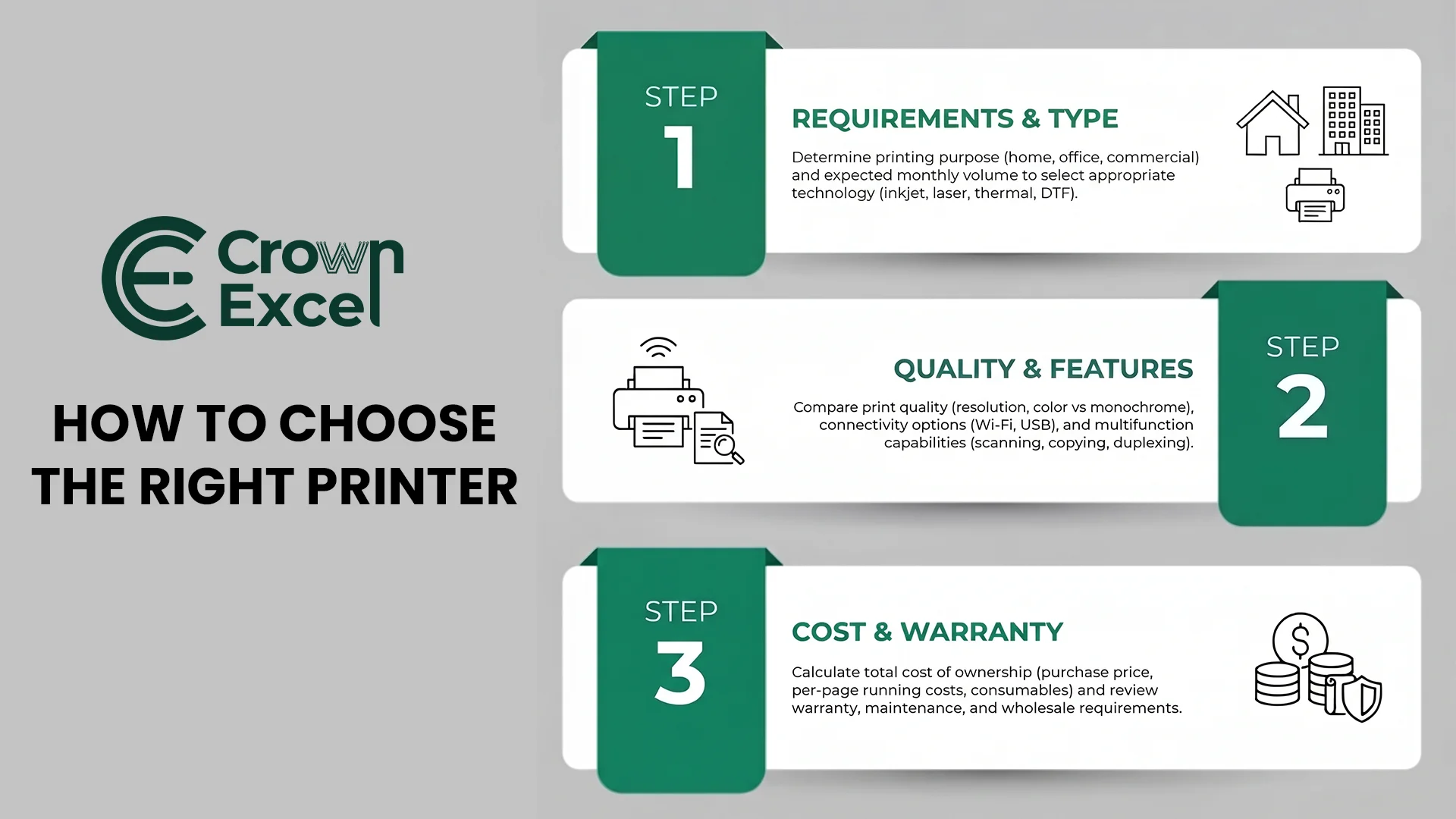
To choose the right printer, identify your main printing requirements and compare printer technology, print volume, speed, running costs, connectivity and purchase price. Inkjet or ink tank printers are often suitable for colour documents and photographs, while monochrome laser printers are practical for regular text printing. Businesses handling large document volumes should consider enterprise printers with appropriate duty cycles, paper capacity and maintenance support.
Follow these steps when choosing a printer:
Identify Your Printing Purpose: Determine whether the printer will be used for home documents, office records, photographs, labels, commercial production or garment printing.
Select the Printer Type: Choose inkjet or ink tank technology for suitable colour applications, laser printing for many office workflows, thermal printing for receipts and labels, or specialized equipment such as DTF printers for garment customization.
Estimate Monthly Printing Volume: Calculate approximately how many pages or items you expect to print. Compare this requirement against the manufacturer's recommended monthly print volume rather than relying only on its maximum duty cycle.
Decide Between Colour and Monochrome: Choose a monochrome printer if most documents contain black text. Select a colour printer when photographs, presentations, graphics or colour-coded documents are regularly required.
Compare Printing Speed: Check the rated speed in pages per minute (PPM) or images per minute (IPM), using comparable test standards where possible. High-volume offices may benefit from faster printers.
Evaluate Print Quality: Compare resolution, colour capabilities, ink or toner technology and sample output. The advertised dots-per-inch (DPI) value alone does not determine overall image quality.
Check Connectivity: Determine whether USB, Ethernet, Wi-Fi, Wi-Fi Direct or mobile printing support is required. Verify compatibility with your computers and operating systems.
Consider Multifunction Features: Choose a multifunction printer if scanning and copying are required. Automatic document feeding and duplex scanning may be useful for handling large document sets.
Calculate Printing Costs: Review the printer purchase price, ink or toner replacement costs, consumable yields and expected cost per page. A cheaper printer may have higher long-term running costs.
Check Paper Handling: Confirm supported paper sizes, media types, input tray capacity and automatic duplex printing features.
Review Warranty and Maintenance: Check warranty conditions, consumable availability, service support and the cost of replacement parts.
Evaluate Wholesale Requirements: For bulk procurement, compare exact models, minimum order quantities, delivery schedules, stock availability, warranties and supplier quotations.
How Do I Connect My PC to My Printer?
To connect your PC to a printer, turn on the printer and connect it using a USB cable or the same Wi-Fi network as your computer. On Windows 11, open Settings > Bluetooth & devices > Printers & scanners > Add device, select your printer and follow the installation instructions. If the printer is not detected, install the compatible driver recommended by its manufacturer. Once connected, print a test page to confirm that the printer works correctly.
How to Maintain Printers for Good Working Condition
To maintain a printer in good working condition, clean accessible exterior surfaces, remove dust, use compatible paper and replace ink or toner when necessary. Keep the printer in a clean, dry and well-ventilated location. For inkjet printers, print periodically and follow the manufacturer's instructions for nozzle checks or printhead cleaning when print quality deteriorates. Avoid unnecessary repeated cleaning cycles because they consume ink.
Check paper trays and rollers for dust, damaged paper and debris, and remove paper jams according to the printer's instructions. Install manufacturer-approved firmware updates, use suitable consumables and schedule professional servicing when required. For laser printers, allow hot internal components to cool before maintenance and avoid touching or cleaning sensitive parts unless the manufacturer's instructions specifically permit it.